
Introduction
Use this guide when a VMCsi has two spindle probes. Loading two probes in the tool changer is not enough: both probes share one data record, so calibrating or using one overwrites the other. One machine data change and two setting data changes give each probe its own record.
-
-
Take an archive before changing any data. Archive Current System
-
Set Manufacturer Password. Setting Manufacturer Password
-
Set up both spindle probes in the tool table, each as its own tool in its own pocket.
-
Example from the field: Probe 1 in pocket 40, Probe 2 in pocket 20.
-
-
-
Go to [Setup] → [Mach. Data] → [General MD].
-
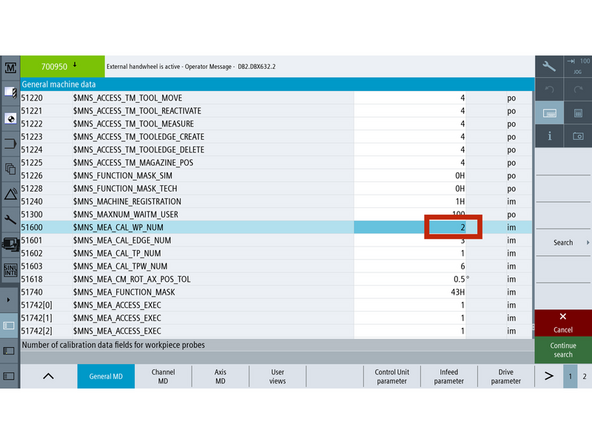
Press [Search], enter 51600.
-
Set the value to 2.
-
51600 sets the number of probe data records. 2 gives each probe its own record.
-
51600 takes effect immediately (im). No reset is needed.
-
-
-
Go to [Setup] → [Mach. Data] → [Page 2] → [General SD].
-
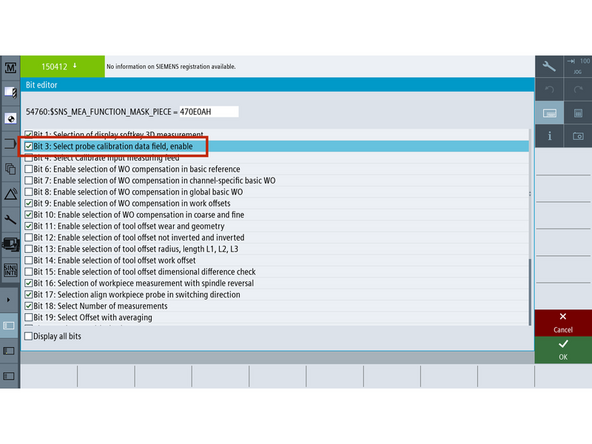
Press [Search], enter 54760.
-
Set bit 3 to 1 (checked on). Leave the other bits as they are.
-
54760 takes effect immediately (im). No reset is needed.
-
-
-
Stay in [General SD].
-
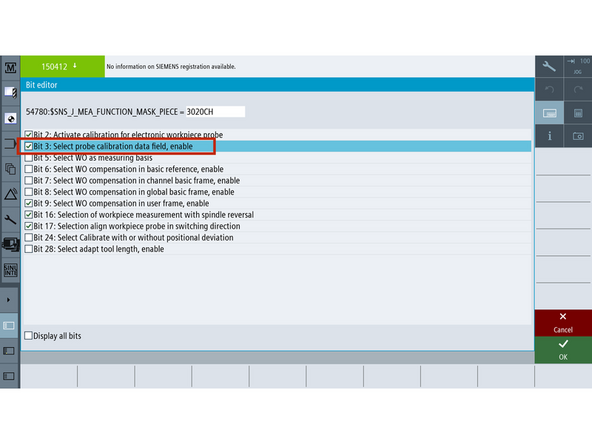
Press [Search], enter 54780.
-
Set bit 3 to 1 (checked on). Leave the other bits as they are.
-
54780 takes effect immediately (im). No reset is needed.
-
-
-
Load Probe 1 into the spindle and calibrate it.
-
-
Load Probe 2 into the spindle and calibrate it.
-
-
-
Test each probe on its own.
-
Switch back and forth between the probes a few times.
-
Confirm Probe 1's values still match after using Probe 2, and the other way around.
-
If one probe's values changed, the records are still shared. Do not use the probes. Recheck 51600 and bit 3 in 54760 and 54780.
-


Team