Tools
Parts
No parts specified.
-
-
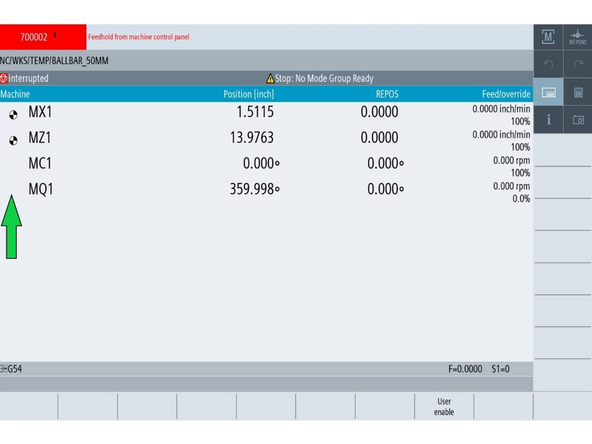
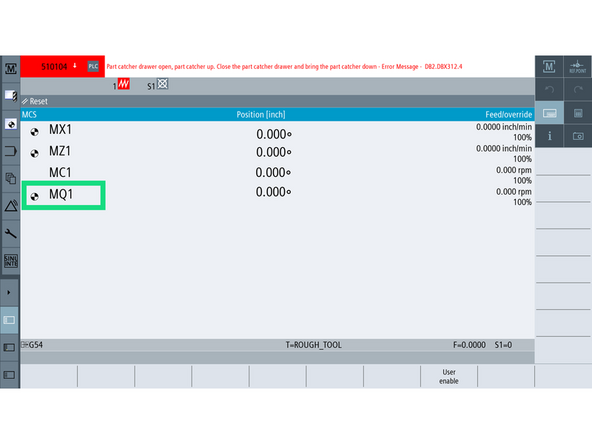
The green arrow in the image points to an axis without a reference set (no icon shown).
-
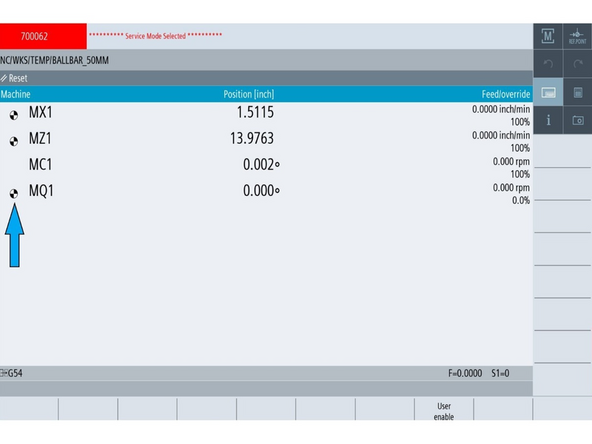
The blue arrow points to an axis with the reference icon — a black-and-white circle.
-
Press [JOG] and [REF POINT] on the MCP.
-
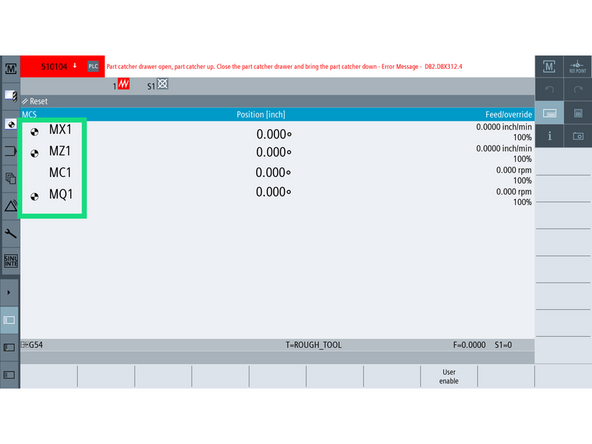
On the [Machine] screen, look for the reference icon beside each axis (e.g., MQ1, MX1, MZ1).
-
This black-and-white symbol confirms the axis has a valid absolute encoder reference. If the icon is missing, the encoder is not referenced and must be set.
-
All servo axes must display this icon before the machine is fully operational.
-
The chuck (MC1) does not display a reference icon because it is not a servo axis and does not require referencing.
-
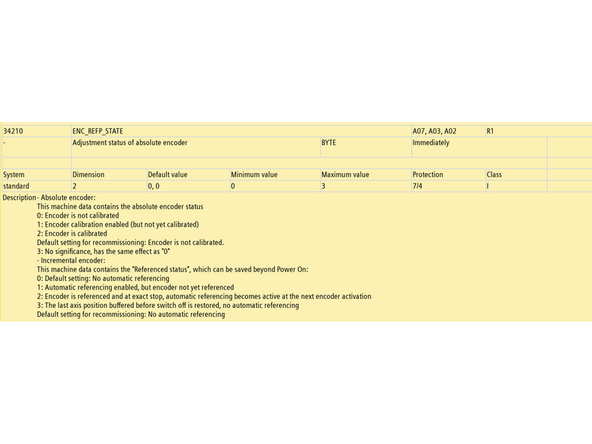
The encoder state is internally tracked using MD34210, which will be reviewed in the next step.
-
-
-
MD34090 $MA_REFP_MOVE_DIST_CORR. The calibration itself, the offset between machine zero and the encoder zero. The control writes it, not you.
-
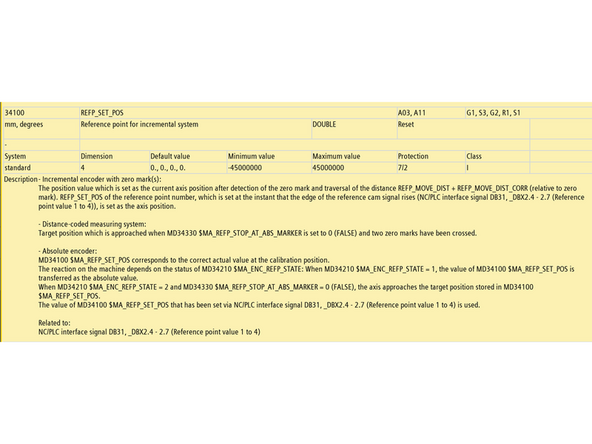
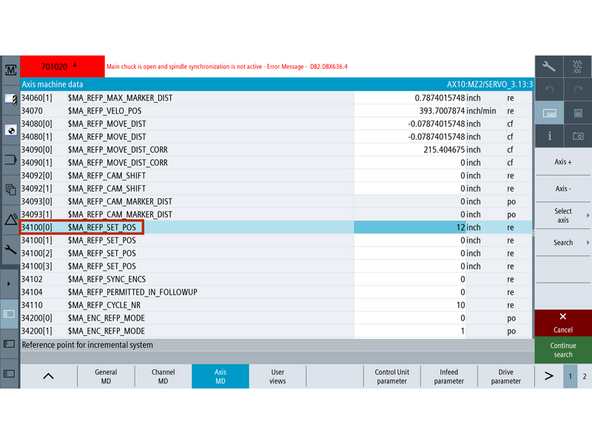
MD34100 $MA_REFP_SET_POS. The coordinate you tell the control the axis is standing at. This is your input.
-
MD34200 $MA_ENC_REFP_MODE. The referencing mode. Must be 0 for this procedure to work.
-
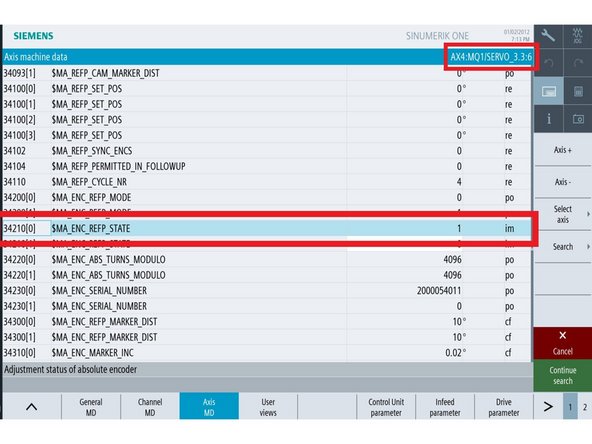
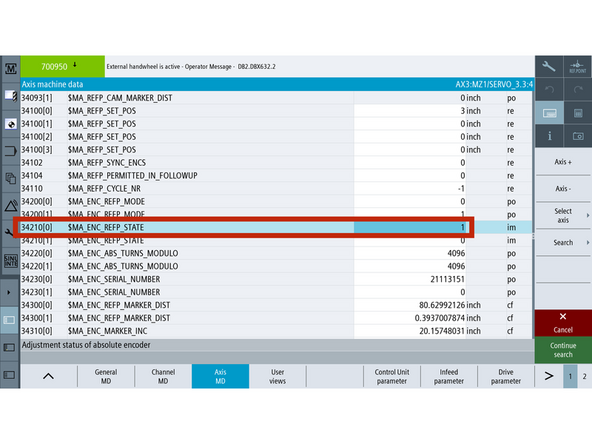
MD34210 $MA_ENC_REFP_STATE. Records whether this axis is referenced. Siemens calls it the adjustment status of the absolute encoder. It holds one of these values:
-
0. Not calibrated. The encoder has no reference to the physical position.
-
1. Calibration enabled. The control will accept MD34100. This is the state you set.
-
2. Calibrated. Written by the control, not by you.
-
With MD34210 = 1, the control transfers MD34100 as the absolute value and computes MD34090 from it. That is the whole mechanism this guide runs on.
-
-
-
The Q-axis represents the degree of rotation of the turret.
-
Move the turret to Position 1
-
Go to [Machine]→ [TSM] → [Select Tool] → Select Tool 1 and press [Cycle Start].
-
Go to [Setup] → [Mach. Data] → [Axis MD] → [Select Axis] → [MQ1/SERVO] → [OK].
-
Press the [Search] button and type 34210.
-
Set MD34210[0] = 1
-
Press [Reset PO] to reboot the machine.
-
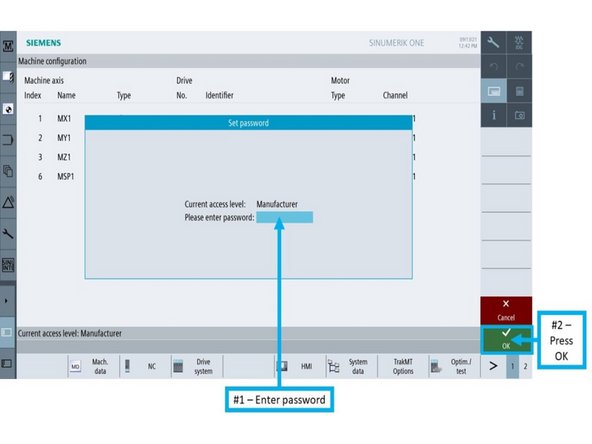
Log back into Manufacturer Mode
-
-
-
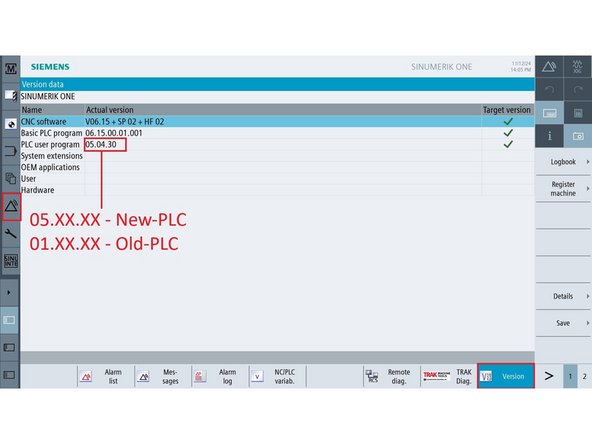
This determines which DB address to use in Step 6.
-
All LTY and LTY-S machines are on New-PLC
-
On the control, go to [Diagnostics] → [Version].
-
Locate the PLC User Program version.
-
If version starts with 05.XX.XX, it is New-PLC.
-
If version starts with 01.XX.XX, it is Old-PLC.
-
-
-
Go to [Diagnostic] → [NC/PLC Variable]
-
In an empty row under Variable, enter the proper bit:
-
Old-PLC → DB34.DBX4.7
-
New-PLC → DB37.DBX4.7
-
Set the Format to [B].
-
On the MCP, press both [JOG] and [REF POINT].
-
Press [Change], enter 1, then press [Input] → [OK]. The bit will toggle back to 0 automatically.
-
Confirm the Q-axis shows the reference icon.
-
-
-
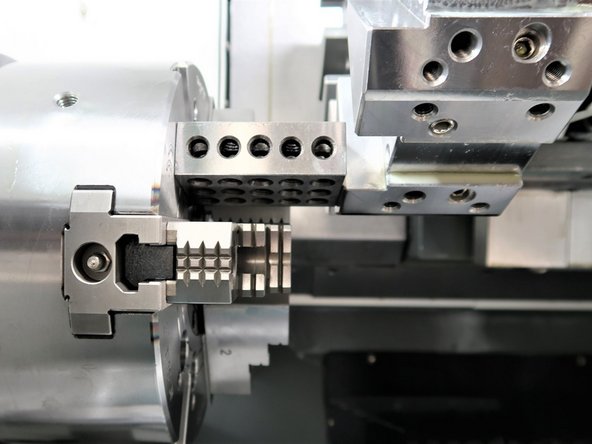
Mount a turret toolholder with a square, machined face in Position 1.
-
For TC820si: Use a boring bar block or standard OD (Outside Diameter) turning tool holder with a flat machined face (e.g., facing or roughing tool block).
-
For TC820LTY and TC820LTY-S: Use a radial live tool holder (facing the spindle) with a square machined face.
-
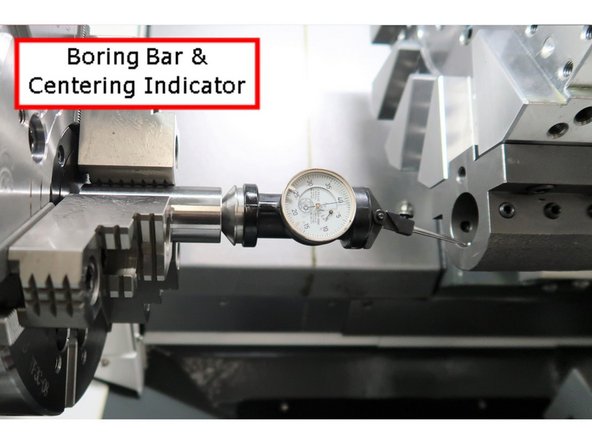
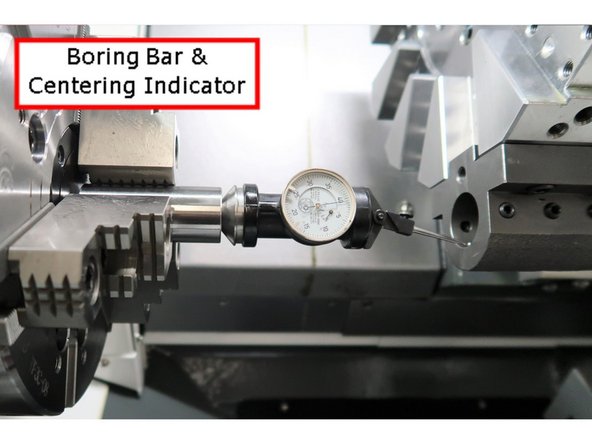
Insert a centering indicator into the spindle
-
Jog X and Z to bring the indicator into contact with the toolholder face.
-
Go to [Machine], press [Act. values MCS] to display Machine Coordinates.
-
Sweep the X-axis back and forth; adjust Z until runout is < 0.001" across +X and −X.
-
This Z-axis position defines the turret’s X0 mechanical centerline.
-
-
-
Go to [Setup] → [Mach. Data] → [Axis MD] → [Select Axis] → [MX1/SERVO] → [OK].
-
Press the [Search] button and enter 34210, then press [OK].
-
On the MCP, turn on [JOG] and [REF. POINT].
-
Set MD34210[0] = 1
-
For TC820 & TC820LTY: Press [+X].
-
For TC820LTY-S: Press the [X] axis button, then press [+].
-
Confirm the X-axis shows the reference icon.
-
-
-
Z0 is established by bringing the turret face into contact with a known-height reference object placed against a defined machine surface.
-
The Z-axis reference value is calculated by subtracting the reference object’s height from the machine position at the moment of contact.
-
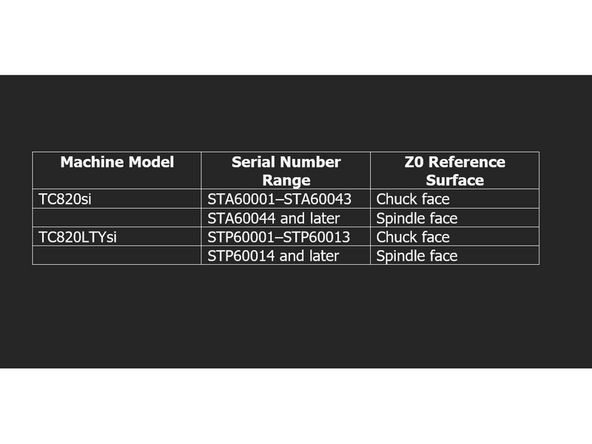
The correct surface to place the reference object depends on the machine model and serial number.
-
TC820si: Serial STA60001–STA60043: Reference from the chuck face.
-
Serial STA60044 and later: Reference from the spindle face.
-
TC820LTYsi Serial STP60001–STP60013: Reference from the chuck face.
-
Serial STP60014 and later: Reference from the spindle face.
-
TC820LTY-Ssi All models reference from the spindle face.
-
-
-
MD34100 tells the control what machine coordinate to assign to the axis during encoder referencing.
-
This value must reflect the height or distance of the physical reference used — such as a 1-2-3 block, 6.000" gauge block, or spindle-to-spindle spacer.
-
Set per axis, MD34100 (Step 11) must be entered before referencing using MD34210 (Step 15) to ensure the encoder aligns with the actual position.
-
-
-
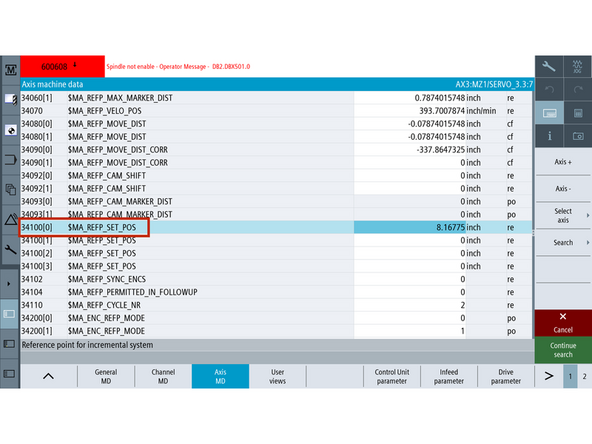
Set MD34100 to match the exact height of the measuring tool or reference stack used when physically referencing the Z1 axis.
-
This value will be assigned as the machine coordinate for Z1 during encoder calibration.
-
TC820 / TC820LTY: Use the block height touched off in Step 12.
-
TC820LTY-S: Use the calculated value from Step 13 & 14: Z1 Reference Value = [Block Height] + A + B
-
Once you have the correct value:
-
Go to [Setup] → [Mach. Data] → [Axis MD] → [Select Axis] → [MZ1/SERVO].
-
[Search] and enter the value in MD34100.
-
This must be set before referencing the encoder in Step 15.
-
-
-
Remove any tool holder from the turret and clear the spindle face (remove any part or chuck jaws).
-
Place a known-height precision block on the correct surface (see Step 9 for which face to use).
-
Slowly jog the Z-axis until the turret face makes light contact with the block.
-
Ensure there is no visible gap, but do not compress or deflect the block.
-
This contact point is +X.XXX" from actual Z0, where X.XXX = height of your reference block.
-
Go to [Machine], press [Act. values MCS] to switch to machine coordinates.
-
Note the MZ1 machine position while the turret face is in contact with the block — this value will be used to set MD34100 in Step 11.
-
-
-
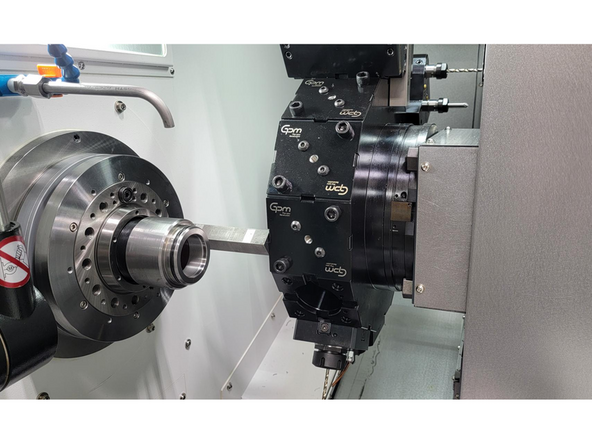
Use turret Position 1 and work directly with the live tool mounting bore
-
Insert a dial indicator into the spindle and align it with the front face of the bore.
-
Jog the X-axis back and forth to verify face squareness.
-
Deflection across the sweep should be less than 0.001".
-
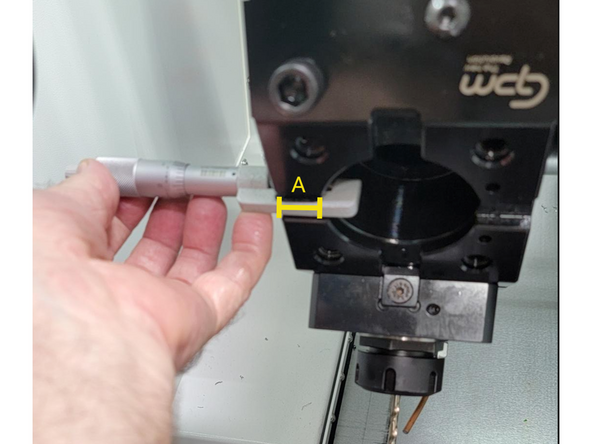
Measure the distance from turret face to tool face — this will be recorded as A.
-
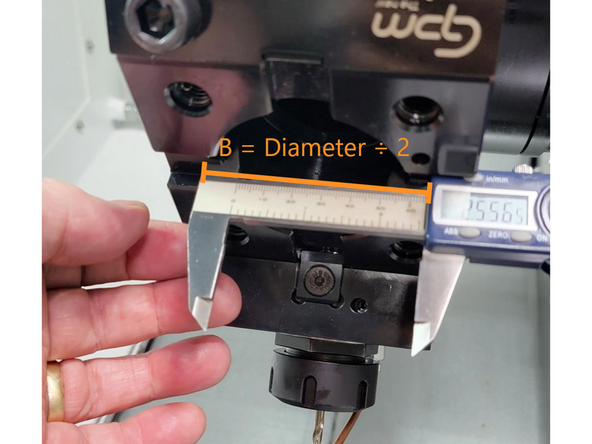
Measure the distance from tool face to tool centerline of the live tool cavity (½ the bore diameter) — this will be recorded as B.
-
These two values (A and B) will be used in the next step to calculate the Z1 reference position.
-
Remove the indicator from the spindle before proceeding.
-
-
-
Place a precision gauge block (6.000" or longer) firmly against the main spindle face.
-
Jog the turret forward until the tool face makes light contact — do not compress the block.
-
Confirm the previously recorded block height, A, and B values from Step 13.
-
Calculate the total: Z1 Reference Value = [Block Height] + A + B.
-
Go to [Machine] → [Actual Values MCS] to display machine coordinates.
-
Record the MZ1 machine coordinate at the moment of contact.
-
This value will be used to set MD34100 in Step 11.
-
-
-
Before continuing, make sure MD34100 has been set correctly in Step 11. This value defines the Z1 position the control will assign during encoder referencing.
-
Go to [Setup] → [Mach. Data] → [Axis MD] → [Select Axis] → [MZ1/SERVO] → [OK].
-
Press the [Search] button and enter 34210, then press [OK].
-
On the MCP, turn on [JOG] and [REF. POINT].
-
Set MD34210[0] = 1
-
For TC820 and TC820LTY: Press [+Z].
-
For TC820LTY-S: Press the [Z] axis button, then press [+].
-
Confirm the Z-axis shows the reference icon.
-
-
-
MD36100 and MD36110 define the allowable travel range for the Z1 axis after referencing. These soft limits must safely enclose the Z1 reference position established in Step 15.
-
Go to [Setup] → [Machine Data] → [Axis MD] → [Select Axis] → [MZ1/SERVO].
-
-
-
Ensure the turret is retracted and out of the way.
-
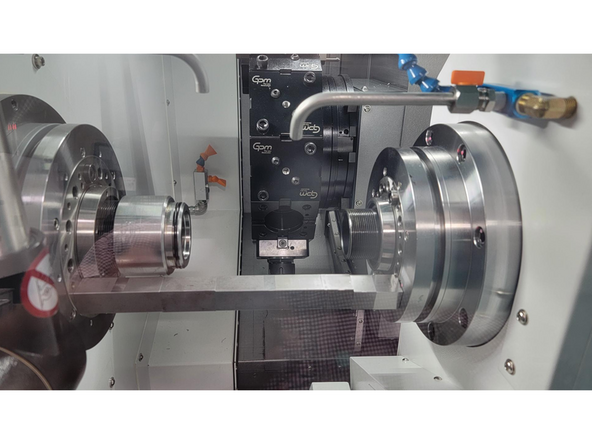
Place a precision gauge block (12.000" or longer) between the main spindle and sub-spindle faces.
-
Jog the sub-spindle forward until light contact is made with the block — do not compress it.
-
Go to [Machine], press [Act. values MCS] to switch to machine coordinates.
-
Note the MZ2 machine position while turret face is in contact with the block.
-
-
-
Set MD34100 to match the exact height of the measuring tool or reference stack used when physically referencing the Z2 axis.
-
This value will be assigned as the machine coordinate for Z2 during encoder calibration.
-
TC820LTY-S: Use the MZ2 position noted in the previous step when the sub-spindle face contacted the reference block.
-
On the control, go to [Setup] → [Mach. Data] → [Axis MD] → [Select Axis] → [MZ2/SERVO].
-
[Search] and enter the value in MD34100.
-
-
-
Go to [Setup] → [Mach. Data] → [Axis MD] → [Select Axis] → [MZ2/SERVO] → [OK].
-
Press the [Search] button and enter 34210, then press [OK].
-
Turn on the [JOG], [REF. POINT], and [Z2] buttons on the MCP.
-
Set MD34210[0] = 1
-
Press the [+] button on the MCP.
-
Confirm the Z2-Axis shows the reference icon.
-
-
-
Insert wisdom here
-
-
-
Confirm all required axes display the black/white reference icon: Q, X, Z1, and Z2 (for TC820LTY-S).
-
Archive machine state to preserve encoder references.
-
-
Send new archive to TRAK Tech Support or upload to Config Folder
-
-
-
TC820LTY-Ssi Config Folder
-
![Go to [Diagnostic] → [NC/PLC Variable]](https://d3t0tbmlie281e.cloudfront.net/igi/trakmtsupport/fyOa35RMPwGZqnMr.medium)
![Go to [Setup] → [Mach. Data] → [Axis MD] → [Select Axis] → [MX1/SERVO] → [OK].](https://d3t0tbmlie281e.cloudfront.net/igi/trakmtsupport/PvAl3nRMTOCxoQUU.medium)
![Press the [Search] button and enter 34210, then press [OK].](https://d3t0tbmlie281e.cloudfront.net/igi/trakmtsupport/kKGI3oRMMOGZqnMr.medium)
![Go to [Setup] → [Mach. Data] → [Axis MD] → [Select Axis] → [MZ1/SERVO] → [OK].](https://d3t0tbmlie281e.cloudfront.net/igi/trakmtsupport/IOFp44RMebGZqnMr.medium)
![Go to [Setup] → [Mach. Data] → [Axis MD] → [Select Axis] → [MZ2/SERVO] → [OK].](https://d3t0tbmlie281e.cloudfront.net/igi/trakmtsupport/in233HRMauK2W6xu.medium)

Team
