

This wiki provides a structured summary of the Auto Door option for TRAK VMCsi machines. Content is sourced directly from the VMCsi Operating Manual (34105) and VMCsi Service Manual (34104).
For an overview of Automation Ready and Auto Door functions across both VMCsi and TCsi platforms, refer to:
VMCsi Operating Manual 4.9 Auto Doors
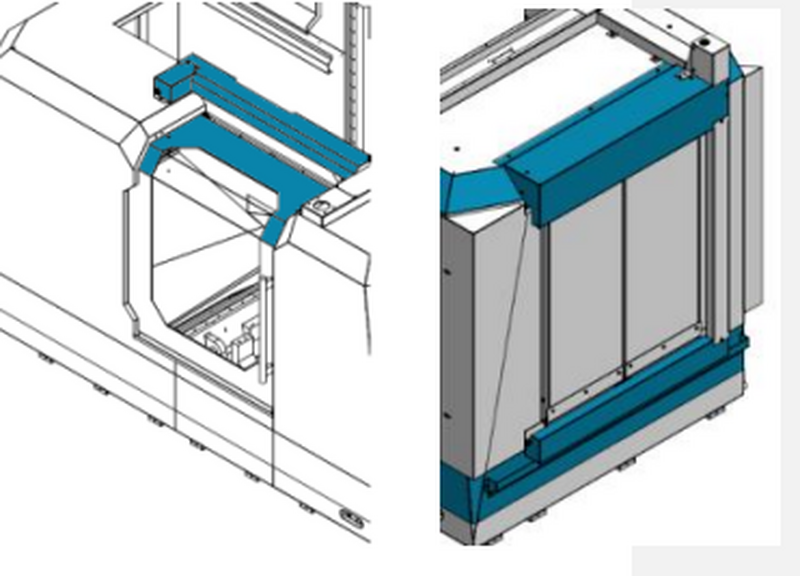
TRAK manufactures Auto Front and Side Door options that allow an end user to have the machine open and close the Front or Side door automatically.
Key Features:
- Position and forced-controlled servo motor.
- End of program auto open.
- Machine cycle stop with Auto Door open.
- Digital I/O controlled.
- Front Door open and close output contacts.
- Side Door open and close output contacts.
- Front and Side Door remote open/close request.
4.9.1 Features Description
| Feature | Description |
|---|---|
| MCP Auto Door Open/Close | When enabled the Auto Door will toggle open and close with every press of the MCP Auto Door button. |
| M0 Auto Door Open | When enabled the Auto Door will open automatically when an M0 is processed. |
| M30 Auto Door Open | When enabled the Auto Door will open automatically when an M30 is processed. |
| Auto Door Close with Remote Cycle Start | When enabled the Auto Door will close whenever a Remote Cycle Start input is triggered. |
| Front Door Close Output | These are a pair of relay contacts that indicate to the automation system that the operator Front Door is closed. If Front Door Option is installed. |
| Front Door Open Output | Normally open contact from the Front Door Open switch that indicates the machine Front Door is fully open. If Front Door Option is installed. |
| Side Door Open Output | Normally open contact from the Side Door Open switch that indicates the Side Door is fully open. If Side Door Option is installed. |
| Side Door Close Output | Normally open contact from the Side Door Close switch that indicates the Side Door is fully closed. If Side Door Option is installed. |
| Request Front Door Open Input | Triggers the Front Door to open if there is no E-Stop condition and the spindle is not turning. If Front Door Option is installed. |
| Request Front Door Close Input | Triggers the Front Door to close if there is no E-Stop condition. If Front Door Option is installed. |
4.9.2 Enable / Disable Auto Doors
TRAK provides a custom screen for enabling/disabling Auto Door Options.
To access:
- At the upper right of the display, press [M].
- Press SETUP from the left VSK menu bar.
- Select TrakMT Options.

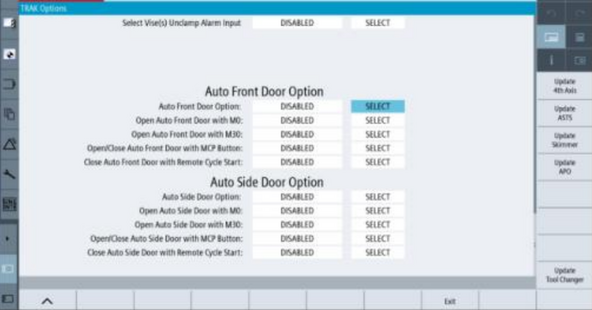
- The Auto Front/Side Door Option can be enabled or disabled in the drop-down menu.
- Takes effect immediately; no restart required.
- When enabled, all features described are available.
Options:
- Open Auto Front/Side Door with M0 – Opens whenever M0 is processed.
- Open Auto Front/Side Door with M30 – Opens whenever M30 is processed.
- Open/Close with MCP Button – Toggles door with every MCP Auto Door press.
- Close Front/Side Door with Remote Cycle Start – Closes door when Remote Cycle Start input is high (24V).
4.9.3 Interface Specifications
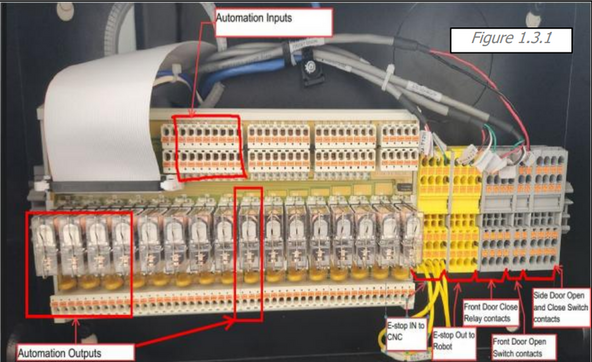
All I/O connections for the Auto Front/Side Door are available in the Automation Ready Box.
4.9.3.1 Front Door Close Output
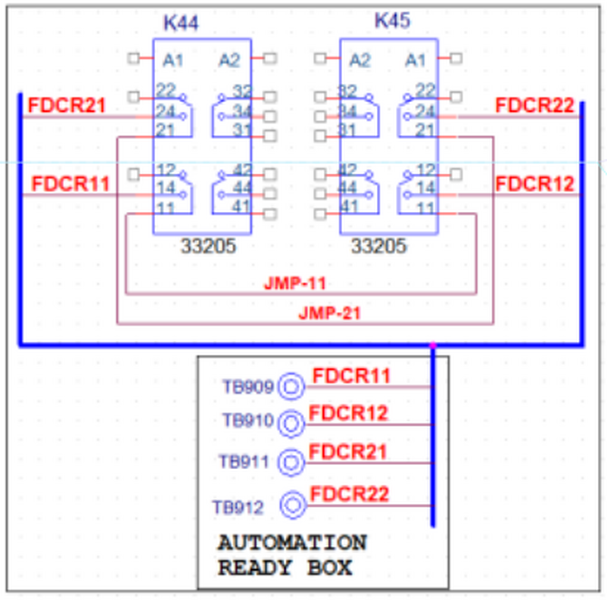
Dual channel Relay Output contacts.
These contacts open when the Front Door is not fully closed.
- Channel 1 (FDCR11 & FDCR12) is between TB909 and TB910
- Channel 2 (FDCR21 & FDCR22) is between TB911 and TB912
- Rated up to 250V, 3 amps
4.9.3.2 Front Door Open Output
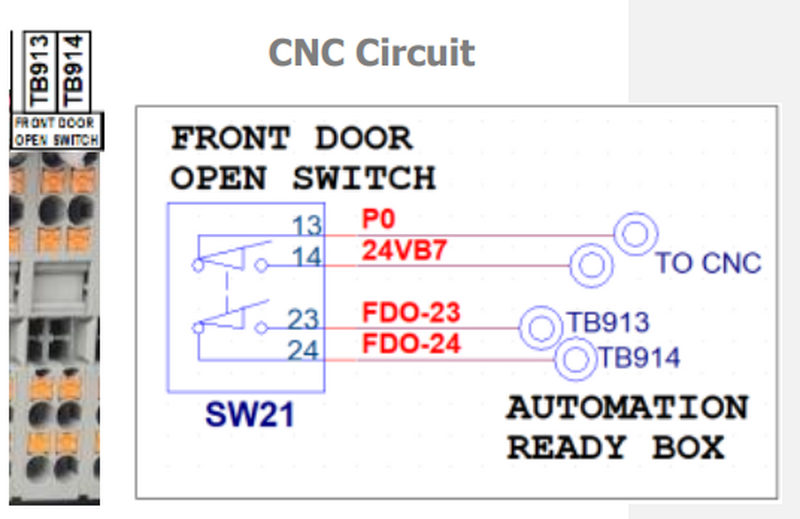
Available with Auto Front Door Option.
Normally Open single switch contact, triggered when door is fully open.
- Circuits Rating Max: 250V, 3 amps
- (FDO23 & FDO24) between TB913 and TB914
4.9.3.3 Request Front Door Open/Close Inputs
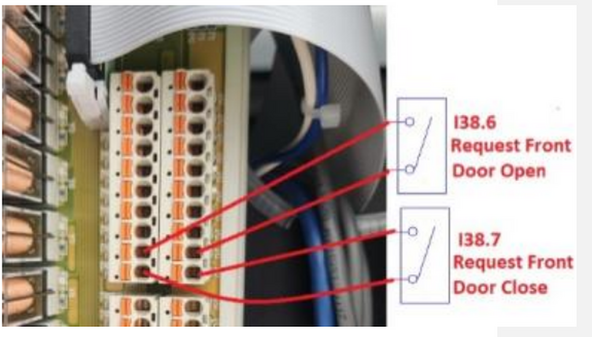
Available with Auto Front Door Option.
Inputs require contact closure between P0 and associated input.
- Input nominal rating: 24V 10mA, Sourcing Digital input
- (Request Front Door Open) Signal: I38.6
- Connection: P0 & A5 terminals on x333 I/O board
- (Request Front Door Close) Signal: I38.7
- Connection: P0 & B5 terminals on x333 I/O board
4.9.3.4 Side Door Open and Close Output
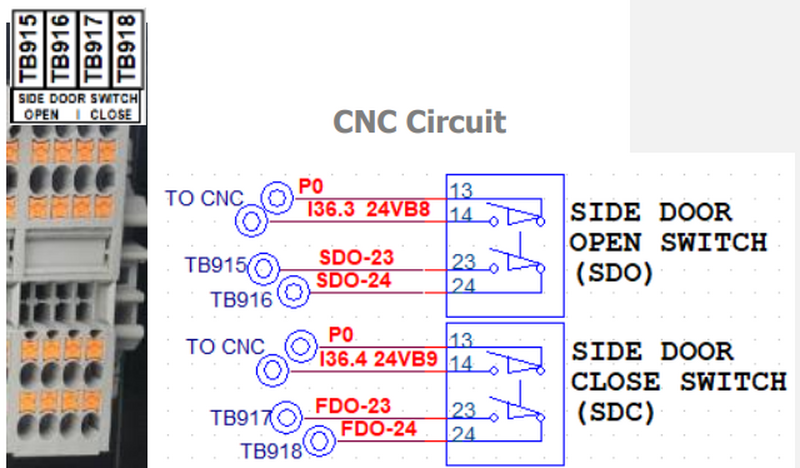
Available with Auto Side Door Option.
Normally Open contacts triggered when Side Door is open/closed.
- Circuits Rating Max: 250V, 3 amps
- (SDO23 & SDO24) between TB915 and TB916
- (SDC23 & SDC24) between TB917 and TB918
4.9.3.5 Request Side Door Open/Close Inputs
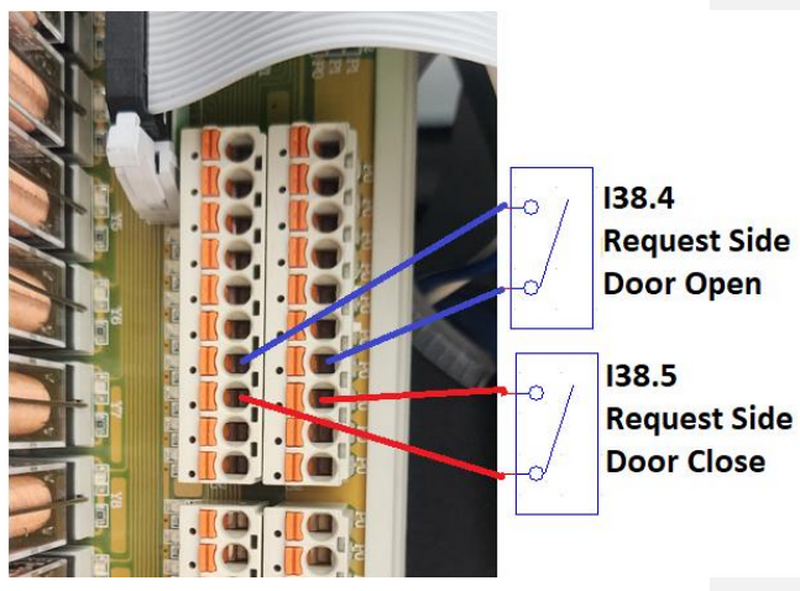
Available with Auto Side Door Option.
Inputs require contact closure between P0 and input.
- Input nominal rating: 24V 10mA, Sourcing Digital input
- (Request Side Door Open) Signal: I38.4
- Connection: P0 & A4 terminals on x333 I/O board
- (Request Side Door Close) Signal: I38.5
- Connection: P0 & B4 terminals on x333 I/O board
4.9.3.6 Automation Ready Inputs
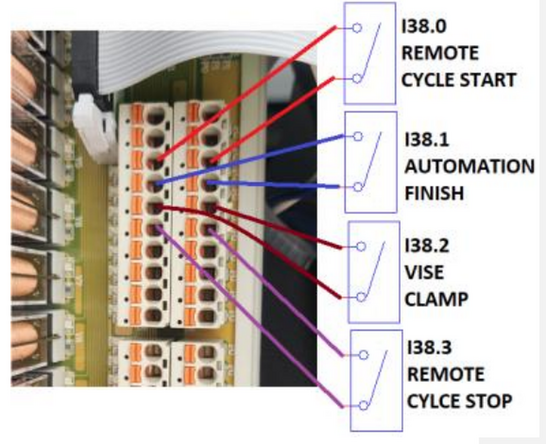
Inputs require contact closure between P0 and input.
- Input nominal rating: 24V 10mA, Sourcing Digital input
- P0 provided internal 24V
- (Remote Cycle Start), Signal: I38.0
- Connection: P0 & A2 on x333 I/O board
- (Remote Cycle Stop), Signal: I38.3
- Connection: P0 & B3 on x333 I/O board
- (Automation Finish), Signal: I38.1
- Connection: P0 & B2 on x333 I/O board
- (Vise Clamp), Signal: I38.2
- Connection: P0 & A3 on x333 I/O board
4.9.3.7 Automation Box Cable Entry Port
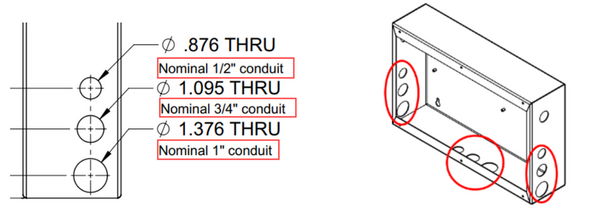
The Automation Box has three sets of 3 hole sizes for conduits/cable glands.
- Each hole sealed with a panel plug. Remove when adding conduit or gland.
Hole Sizes:
- Ø .876 THRU – Nominal 1/2" conduit
- Ø 1.095 THRU – Nominal 3/4" conduit
- Ø 1.376 THRU – Nominal 1" conduit
0 Comments