Introduction
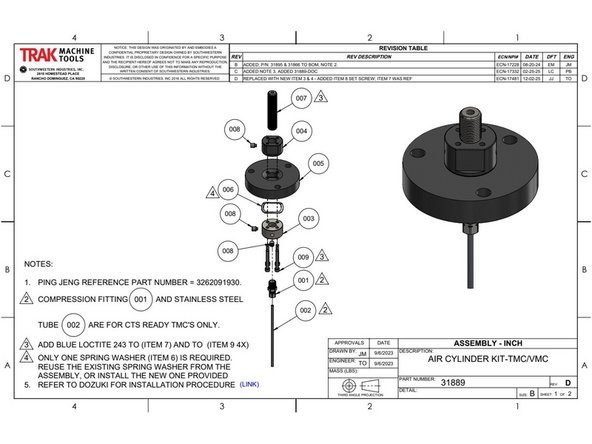
This upgrade replaces the original 31889 Air Cylinder Kit used on VMC and TMC machines.
The original design was prone to coming loose over time. This new kit addresses that issue with a more secure assembly.
This guide provides step-by-step instructions for removing the old components and installing the improved kit.
Tools
Parts
No parts specified.
-
-
Before installing the upgraded Air Cylinder Kit, remove the current assembly.
-
Before starting disconnect the air from the machine.
-
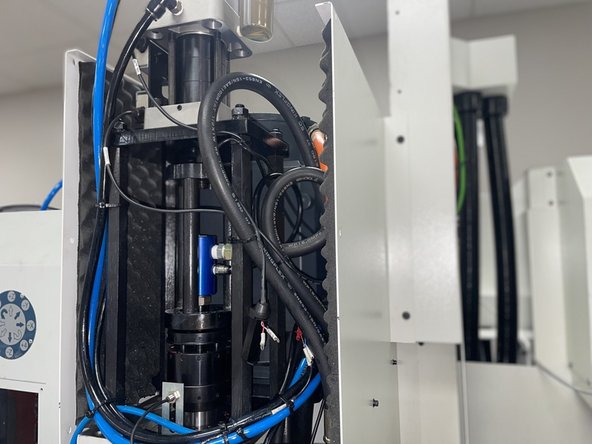
Remove the front cover from the headstock. (Photo 1).
-
After cover removal, determine if the machine is:
-
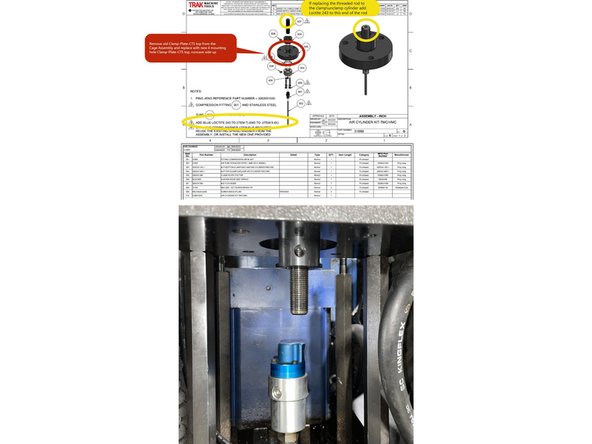
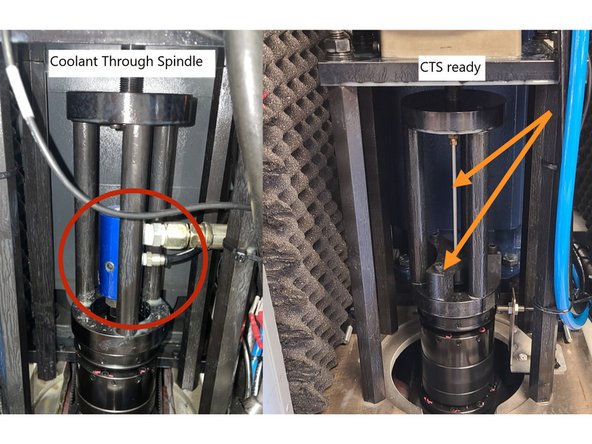
Coolant Through Spindle (CTS Equipped): Has a rotary joint with coolant and air lines (green arrow – Photo 2).
-
Coolant Through Spindle (CTS Ready): No rotary joint; only an air blast line attached to a threaded rod and running through a support brace into the spindle (blue arrows – Photo 2).
-
-
-
For CTS machines: Disconnect the coolant hose and air line, then remove the fittings from the rotary joint.
-
For CTS Ready machines: Remove the lower support bracket and air line together, being careful not to bend the air line.
-
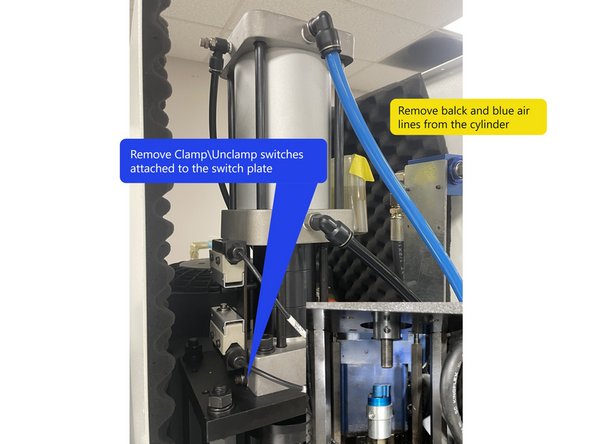
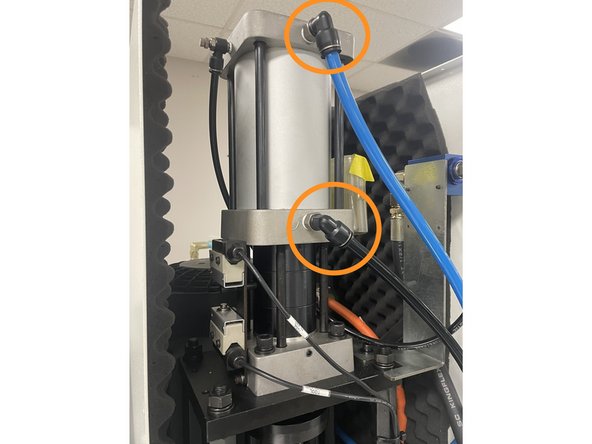
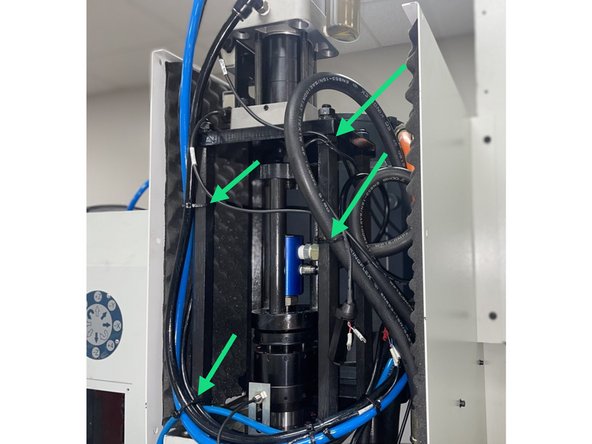
Remove the blue and black air lines from the Clamp\Unclamp cylinder.
-
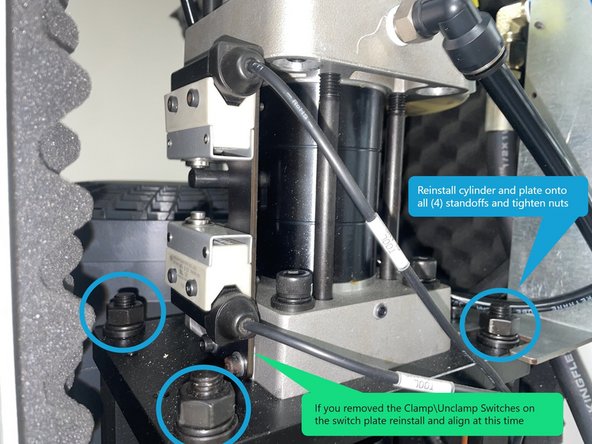
Cut any cable ties as needed to move the cylinder and plate. You may need to remove the Clamp/Unclamp switch plate with switches attached to be able to move the cylinder and plate. (Photo 2).
-
Remove Clamp\Unclamp switch bracket with Switches attached to be able remove the Cylinder and mounting plate from the (4) standoffs.
-
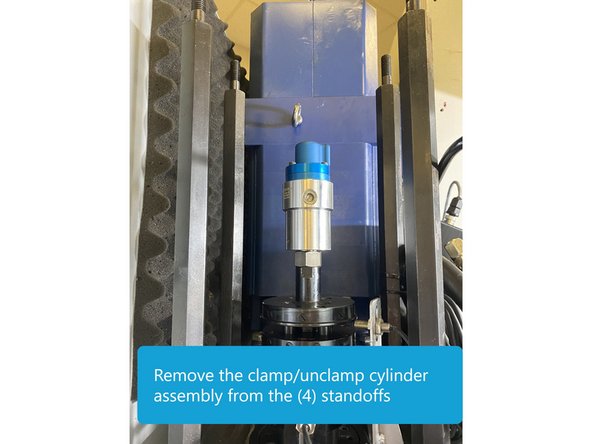
Remove the (4) mounting nuts holding the cylinder plate to the standoffs. Remove the clamp\unclamp cylinder assembly from the standoffs and move over to a work bench to remove existing parts and install the upgrade hardware.
-
-
-
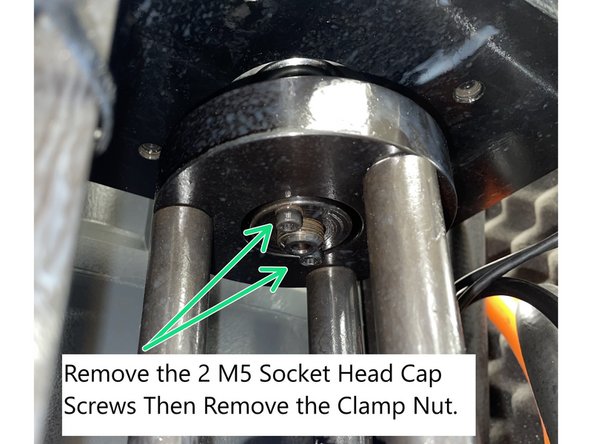
Remove the (2) socket head screws securing the clamp nut to the upper plate. Unscrew and remove the clamp nut (left-hand thread). Unscrew and remove the cage from the air cylinder (left-hand thread). Photo 1
-
If there are 4 SHCS the cage won't be threaded onto the the threaded rod, it will come off when the lower clamp nut is removed.
-
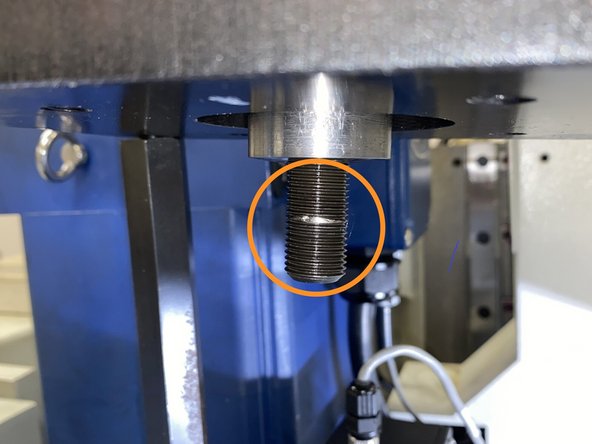
Inspect the threaded rod for damage, replace if damaged. If not already upgraded to 100mm long rod, (item 7 on drawing 31889), replace threaded rod, p/n 3202041090 with the latest revision, which is 100mm in length.
-
-
-
Before installing the threaded rod into the Clamp\Unclamp cylinder, find the end that is threaded internally for the air blast line. This end must not be threaded into the Clamp\Unclamp cylinder as you will not be able to install the air blast line on CTS ready machines if it is.
-
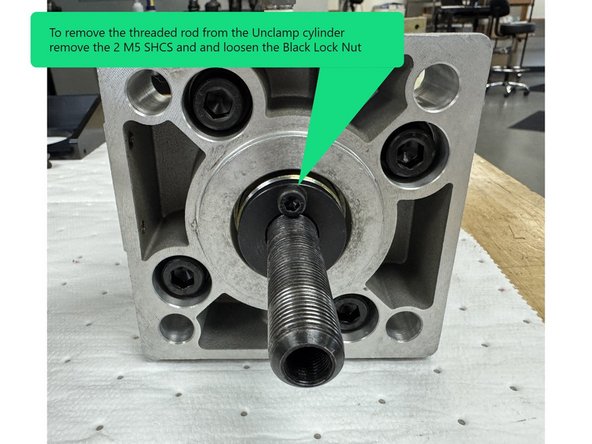
To remove the threaded rod from the Unclamp Cylinder, remove the (2) M5 SHCS and loosen the locknut. Then remove the threaded rod. The threads are left hand threads.
-
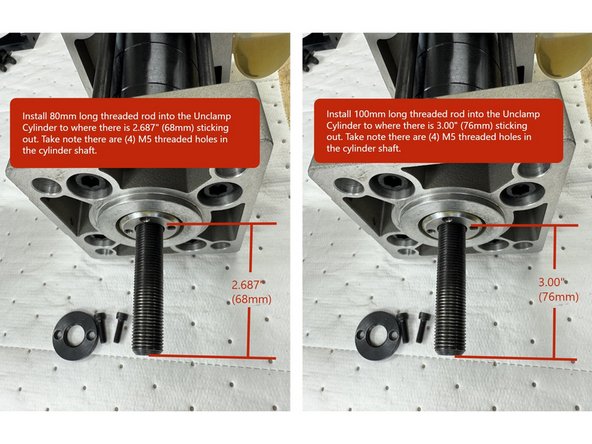
When installing the 100mm long threaded rod into the unclamp cylinder apply Blue Loctite 243 on the end of the rod that goes into the cylinder. Thread the rod into the cylinder to where there is 3.00" (76mm) sticking out.
-
When ever possible you should replace the 80mm threaded rod with the 100mm rod. In the event you can not replace the 80mm threaded rod with the 100mm rod the step below shows the correct adjustment of the original 80mm rod.
-
When installing the 80mm threaded rod into the unclamp cylinder apply Blue Loctite 243 on the end of the rod that goes into the cylinder. Thread the rod into the cylinder to where there is 2.687" (68mm) sticking out.
-
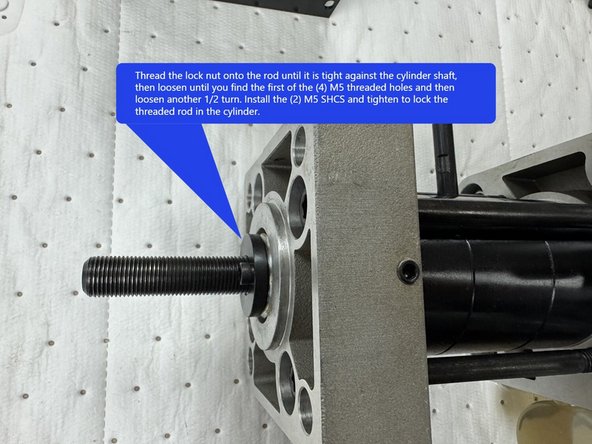
Once the rod is threaded into the Unclamp Cylinder, thread the lock nut onto the rod until it is tight against the cylinder shaft, then loosen until you find the first of the (4) M5 threaded holes and then loosen another 1/4 turn. Install the (2) M5 SHCS and tighten to lock the threaded rod in the cylinder.
-
-
-
Check the threads of the lock nuts for any burrs that may have been caused by drilling and tapping the set screw holes. Clean the threads with a M16-1.0 left handed tap if needed.
-
With the Cage assembly removed from the Unclamp Cylinder remove the old "Clamp Plate CTS Top" from the cage assembly and install the new Clamp Plate with (4) M5 screw holes (P/N 3263041060) Concave side up. See Drawing 31889 in Photo 1.
-
Thread the Nut Air Cylinder (P/N 3263041050-1) onto the threaded rod in the cylinder (left hand thread) convex side down. Thread it far enough to allow installation of the Clamp Plate-CTS-Top (3263041060), Wave Disk Spring Washer (50240308), and Clamp Nut (3202041100-1).
-
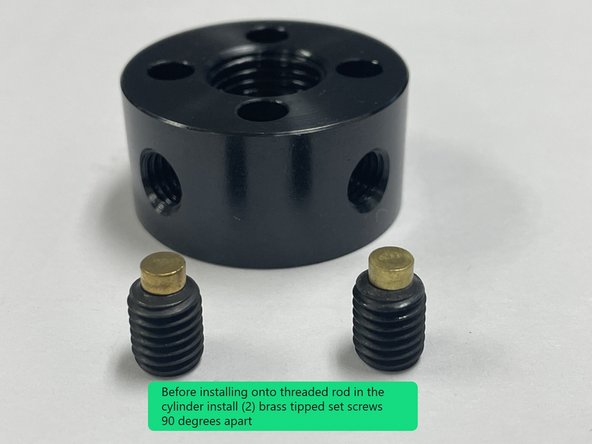
Before installing the lower clamp nut and wave disk spring washer onto the threaded rod in the cylinder install 2 brass tipped set screws into the lower clamp nut 90 degrees apart.
-
-
-
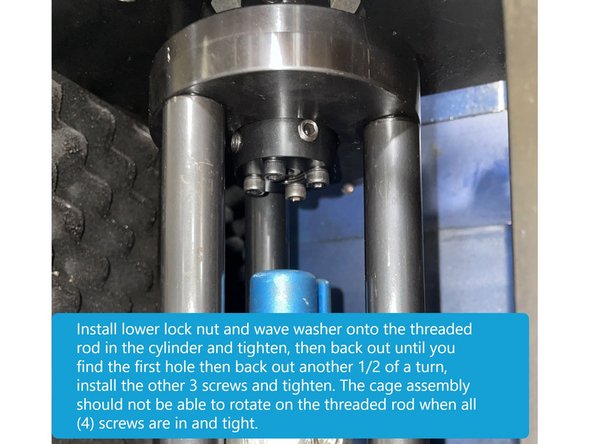
Install cage assembly to threaded rod then install the lower clamp nut with spring washer.
-
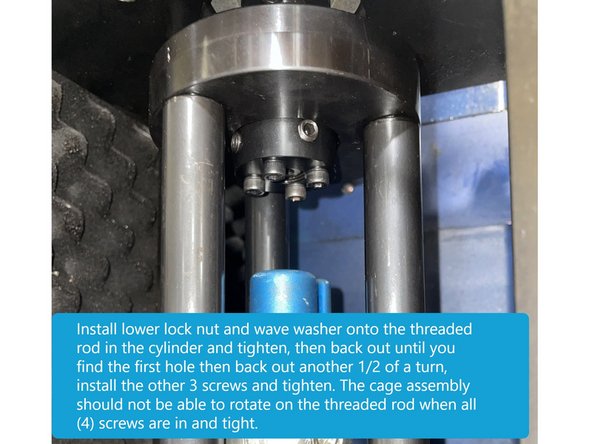
Next Install one M5-0.8x40 SHCS through the Clamp Nut and into the Clamp Plate-CTS-Top on the threaded rod, while holding the upper lock nut with a wrench tighten the lower lock nut until tight, then back off until you find the first threaded hole then back off another 1/2 turn, so that the screw can be threaded into the Clamp Plate.
-
Install the remaining 3 screws and tighten them all in a crossing pattern. There should still be a slight pivoting motion between the clamp plate and lock nuts for self-alignment. You want the cage assembly to be able to move under the tension of the wave washer but you don't it to be loose.
-
If the cage assembly is tight and can't be moved, remove the 4 SHCS and backout the lower clamp nut another 1\4 turn and check again. Once there is the proper pivoting motion slightly loosen the 4 SHCS so you can adjust the bump out later in this procedure.
-
Caution: Be sure when the (4) M5 X 40 screws are tight the cage assembly can't rotate on the M16 threaded rod
-
-
-
Here is a short video of how to adjust the adjust the cage assembly.
-
-
-
Reinstall the Clamp\Unclamp Cylinder with new Air Cylinder Kit onto the (4) large standoffs. Tighten the mounting nuts securely.
-
Reinstall the Clamp\Unclamp Switches on the switch plate. Adjust the switches so that when engaged the switch is depressed at least half of its travel.
-
Reinstall the Blue and black Clamp\Unclamp air lines to the cylinder.
-
Reconnect the air to the machine at this time so the spindle bump out can be adjusted.
-
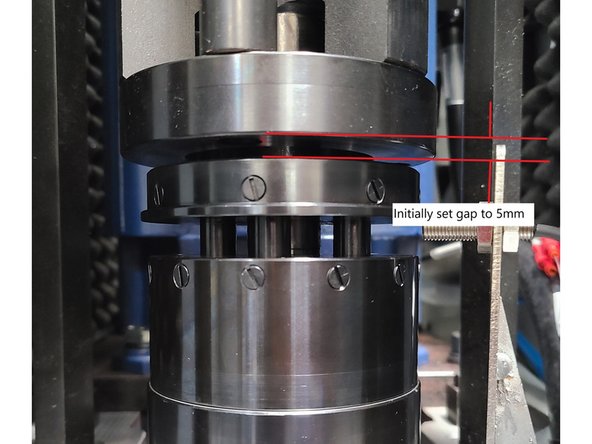
Adjust the Air Cylinder Kit so there's a 5mm gap between the cage assembly and the spindle.
-
Note: The 5mm gap is an initial adjustment, it may need to be adjusted further in the next step.
-
-
-
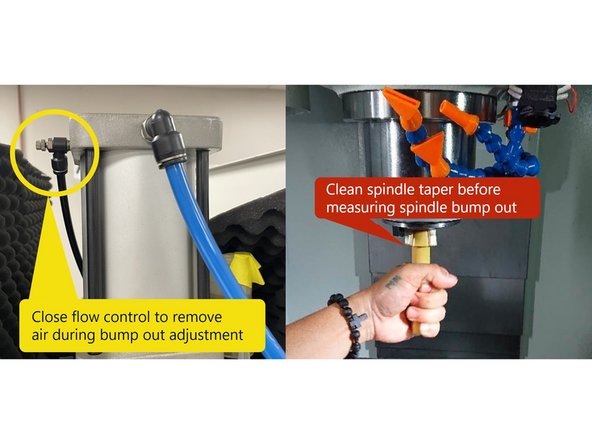
Prior to adjusting the spindle bump out, the through spindle air needs to be turned off so that the air pressure doesn't give a false reading during the bump out measurement. Locate the air Flo Control valve on the top of the Clamp/Unclamp cylinder and close it to remove the air pressure. See Photo 1
-
Clean the spindle taper to ensure it’s free of coolant and debris. Photo 1
-
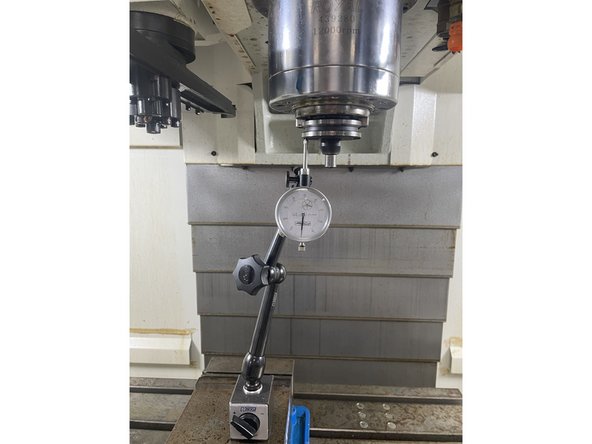
To measure the spindle bump out put a 40 taper tool holder into the spindle. Then set up a dial plunger indicator on the tool holder and zero. To test the bump out, hold onto the tool holder and unclamp the tool and watch the indicator, it should move between 0.015" to 0.025".
-
If adjustment is needed, loosen the 4 M5 screws and rotate the cage assembly up or down, to achieve the 0.015" to 0.025" bump out. Then apply 243 Loctite to the 4 M5X40 SHCS and tighten the screws in a crossing pattern. Verify that the cage assembly can't rotate when the 4 M5 screws are tight.
-
Once the bump out adjustment is completed, re-open the through air flow control 6 to 7 turns.
-
-
-
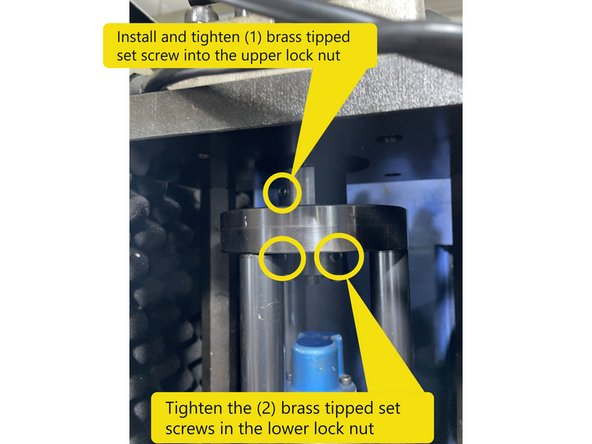
Once the bump out has been adjusted and the (4) M5X40 SHCS have been tightened, install (1) brass tipped set screw into the upper lock nut and tighten, then tighten the (2) brass tipped set screws in the lower lock nut.
-
For CTS machines: Reconnect the air and coolant fittings to the rotary joint.
-
For CTS Ready machines: Reinstall the air tube and support bracket carefully to avoid bending.
-
The air tube should be Stainless Steel not Aluminum
-
Replace any tie wraps cut during disassembly.
-
Confirm all hardware is securely fastened. Reinstall the front sheet metal cover. Clean the machine to complete the installation.
-
When reinstalling the front cover and manual unclamp button, verify that the unclamp button cable isn't pinched between the cover and the casting before tightening the screws. To inspect, lower the head all the way and look from the top down to see that the cable isn't pinched. If it is remove the cover and inspect the cable for damage.
-


Cancel: I did not complete this guide.
One other person completed this guide.
